Capture it. Prove it.Protect your entitlements.
Built for Australian Subcontractors
Stop managing variations with memory.
Capture changed work when it happens. Keep the photos, facts and supporting information together. Prepare the variation for review and track what happens next.
Requests are manually reviewed before a founder walkthrough or product access is offered.
Private-beta access
- Request
- Manual review
- Founder walkthrough
- Access offer
- 30-day trial
VariationGuard prepares. Your authorised team reviews and decides before anything consequential is sent.
Built for subcontractors who want cleaner variation records before final account. Draft commercial administration support only. Not legal advice. No notices are sent automatically.

The work gets done. The paperwork gets missed.
Most subbies don’t lose variation value because the work wasn’t real. They lose it because the record was thin by the time anyone went looking for it.
Directions given verbally, never confirmed
A builder asks for a change at the scaffold. The work happens. Nothing is written down while anyone still remembers the words.
Notice deadlines missed
Your subcontract gives you a window to give notice. Nobody is counting the days against the clause until it has already closed.
Evidence scattered across phones and inboxes
Photos on one phone, the instruction in someone's inbox, the dockets in the ute. Assembling it weeks later is the expensive part.
Variations remembered only at final account
The ones nobody wrote up become the ones you argue about last, with the least support and the least leverage.
Set it up once, before the first variation arrives
This is the part that makes everything afterwards quick. It is a sit-down at the start of a project, not an ongoing job.
- 1
Give it your subcontract and scope
Add the scope of works and the variation clause for the project. VariationGuard pulls out your inclusions, exclusions, free-issue items and spec limits, keeping the exact wording it took each one from.
- 2
Approve the rules that decide whether you get paid
Check four things from your own clause: whether notice is required, what starts the clock, how long you have, and in what units. Nothing is used until you approve it.
- 3
Then just capture
From there, every instruction is checked against the records you approved. The setup is why the assessment can say anything useful about your job rather than variations in general.
It reads the instruction against your subcontract, not a generic template
Every instruction goes through the same six checks, in order, before anything is classified. Each answer cites the scope entry it relied on — or says plainly that no relevant clause exists.
Exclusion match
Does an exclusion in your scope cover the work you have just been asked to do?
Free-issue supply breach
Does the instruction move a supply boundary you priced as free-issue?
Inclusion coverage at spec
Does an inclusion actually cover it at the same specification? Sharing a topic is not the same as covering it.
Additional quantity / re-work
Is there added quantity, a new location, work being redone, or acceleration out of sequence?
Drawing baseline
Is it on the contract baseline drawings? A later revision is not the baseline.
Direction to perform work
Is this a direction for you to carry out work at all, or something else entirely?
Eight things it looks for
Behind those checks it looks for eight specific signals: work hitting an exclusion, a free-issue supply boundary moving, a specification mismatch, added quantity, a new location, re-work of something already built, acceleration or out-of-sequence work, and a drawing change after the contract baseline.
A potential notice deadline from your own clause
Using the notice rules you approved and the date you entered, it works out a potential deadline and shows how close it is. Where the clause starts the clock on something it can’t know, it says the deadline is unknown rather than guessing. It is an administrative aid, not a legal determination — always review it against your subcontract.
Certified benchmark
On a held-out test set the classification engine scored 92.5% accuracy with 0% false-in-scope— it did not once call genuinely varied work “in scope”. Engine checklist_v2, certified 20 July 2026.
That is a benchmark measured on a held-out test set, not a promise about your project or a customer result. Every assessment is a draft for you to review — whether something is a variation depends on your subcontract and the facts of the job.
Nothing is sent automatically
Capture the instruction before the details go cold.
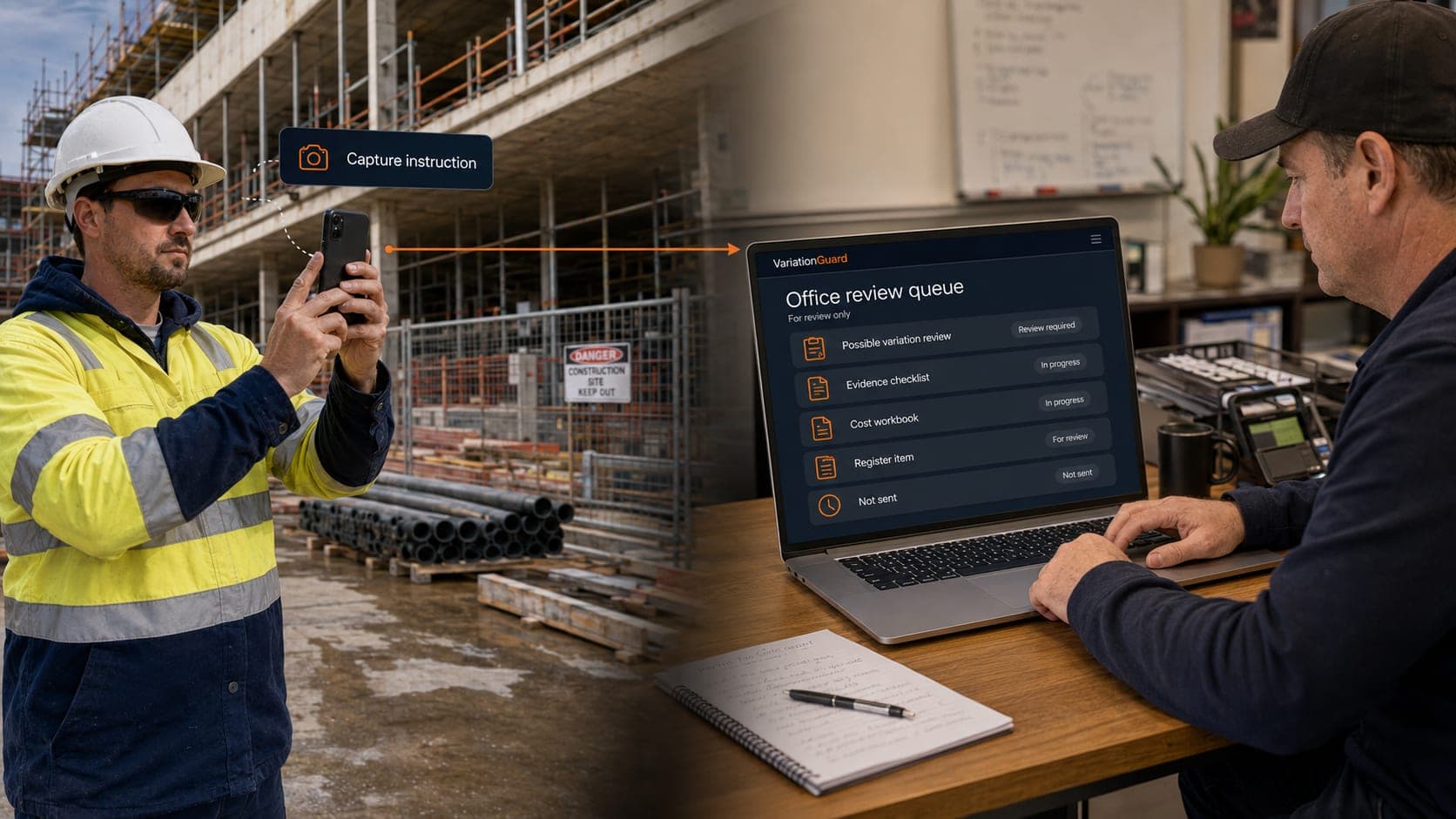
Use VariationGuard to turn a site instruction into a review item, draft notice, evidence checklist and register entry.

What you get from one captured instruction
Draft variation notice
Cautious, professional draft wording that says the instruction may constitute a variation, subject to your subcontract and the project facts.
Verbal direction confirmation
For verbal site instructions, create draft confirmation wording while the details are still fresh.
Covering email
A short, ready-to-edit email to accompany the draft notice or submission.
Evidence checklist
Prompts for the records to collect now — instruction, drawings, photos, timesheets, dockets, labour, plant and materials.
Potential notice deadline
A calculated reminder based on the subcontract notice settings you configure, for review only.
Register item
Every captured instruction can be tracked in a live register so it does not disappear before final account.
Price the variation without losing the breakdown.
A variation is easier to review when the cost build-up is clear.
VariationGuard’s cost workbook helps you build the price using labour, materials, plant, subcontractors, other costs, overhead, profit and GST.
- Labour, materials, plant and subcontractor rows
- Overhead, profit and GST
- Subtotals and totals
- CSV export
- Costed submission wording for review
The cost workbook is a calculation aid and commercial admin tool, not accounting, tax, QS or legal advice.
Variation cost workbook
| Labour | — |
| Materials | — |
| Plant | — |
| Subcontractors | — |
| Other costs | — |
| Overhead | — |
| Profit | — |
| GST | — |
| Total | — |
Example layout. Figures you enter stay editable and exportable.
Straightforward plans. Access stays controlled.
Plans include a 30-day trial when access is offered. Basic then starts at $19/month.
Basic
Recommended$19/month
For a subcontractor running a few projects at a time.
1 user (owner only)
- Manually reviewed private-beta access
- 20 builder instruction checks / month
- 10 draft variation notices / month
- Up to 3 active projects
- Manual paste workflow
- Limited inbound forwarding (5 emails / month)
- Clause profile & time-bar tracking
- Cost workbook
- Variation register
- CSV exports
Basic access is invite-only while public self-serve signup remains closed.
Pro
$199/month
For subcontractors with multiple projects or a team.
Up to 25 users
- Manually reviewed private-beta access
- High-volume fair-use instruction checks
- High-volume fair-use draft notices
- Project inbound forwarding aliases
- Multiple users on the same email domain (rolling out during beta)
- Multiple active projects
- Clause profiles & time-bar tracking
- Cost workbooks
- Register & workbook CSV exports
- Priority support (rolling out during beta)
Pro is in private beta. We help you onboard and tune limits with you, and some features below are still rolling out.
One missed variation can cost thousands. Basic starts at less than $5 a week.
Feature limits may be adjusted during private beta. All outputs are drafts for review. See full pricing
You stay in control.
VariationGuard helps with commercial administration. It does not replace your judgement, your subcontract review or professional advice.
Not legal advice
VariationGuard helps you organise information and prepare drafts. Whether something is a variation depends on your subcontract and the project facts.
Not auto-send
Every output is a draft and nothing goes out automatically. Copy it and send it yourself, or use Submit variation — which emails your nominated recipient only after you review it and click Send.
Not a guarantee
It does not promise payment, approval or entitlement. It helps you create cleaner, earlier, better-supported commercial records.
Not a dispute tool
It is built to help subcontractors communicate clearly and keep records, not to pick fights with builders.
Request a private demo
We are looking for subcontractors who want a simpler way to capture builder instructions, draft notices, price variations and keep a cleaner register.
- Trade business owners onsite during the day
- Small teams with office/admin support
- Subcontractors dealing with verbal directions, builder emails and site instructions
- Businesses that want to stop leaving variation admin until final account
Requests are reviewed manually. Submitting one does not create an account or book a demo automatically.
Questions, answered straight
Is VariationGuard legal advice?
No. VariationGuard provides draft commercial administration support only. It does not provide legal advice or determine your legal rights.
Does VariationGuard send notices automatically?
No. Nothing is sent automatically. You review and edit every draft, then either copy and send it yourself or use Submit variation, which emails the recipient you nominate only after you review it on screen and click Send.
Does it guarantee I will be paid?
No. VariationGuard does not guarantee entitlement, payment or builder approval. It helps you capture information earlier and keep cleaner commercial records.
Who is it for?
VariationGuard is built for subcontractors and trade contractors, especially small to medium businesses that need a simple way to capture, draft, price and track variations.
Can I use it from site?
Yes. VariationGuard is designed for mobile-friendly field capture, so instructions can be recorded while they are fresh.
Can my admin or partner review items later?
Yes. The workflow is designed for field-to-office review. Site captures the instruction. Office/admin reviews, prices and prepares the submission.
What trades can use it?
Electrical, mechanical, plumbing, fire, ceilings, partitions, plasterboard, joinery, waterproofing, roofing, flooring, tiling, painting, glazing, civil, landscaping, steel, fitout and remedial contractors.
Can I enter my subcontract notice period?
Yes. VariationGuard can store subcontract notice requirements and use them to flag potential notice deadlines for review.
What happens after the trial?
After the 30-day free trial, you can keep using VariationGuard from $19/month.